Google Chrome fans that enjoy usingHandoffto create a seamless experience between their iOS device and their Mac have been long disappointed in the third-party web browser’s inability to support such a feature.
Fortunately, those sporting a device with a jailbreak can now take advantage of a new freejailbreak tweakcalledChrome Handoff, which will enable Handoff for Chrome between your iOS device(s) and Mac. In this piece, we’ll show you how it works!

Unlocking Handoff for Chrome
First and foremost, and probably obvious, is that Chrome Handoff requires that you have Google Chrome installed on your Mac, as well as on your jailbroken iOS device. If you do, then you can go ahead with installing Chrome Handoff from Cydia’s BigBoss repository.
The tweak is going to require a full-on reboot of your device after installation instead of a respring, so don’t be surprised when Cydia asks you to reboot your device.
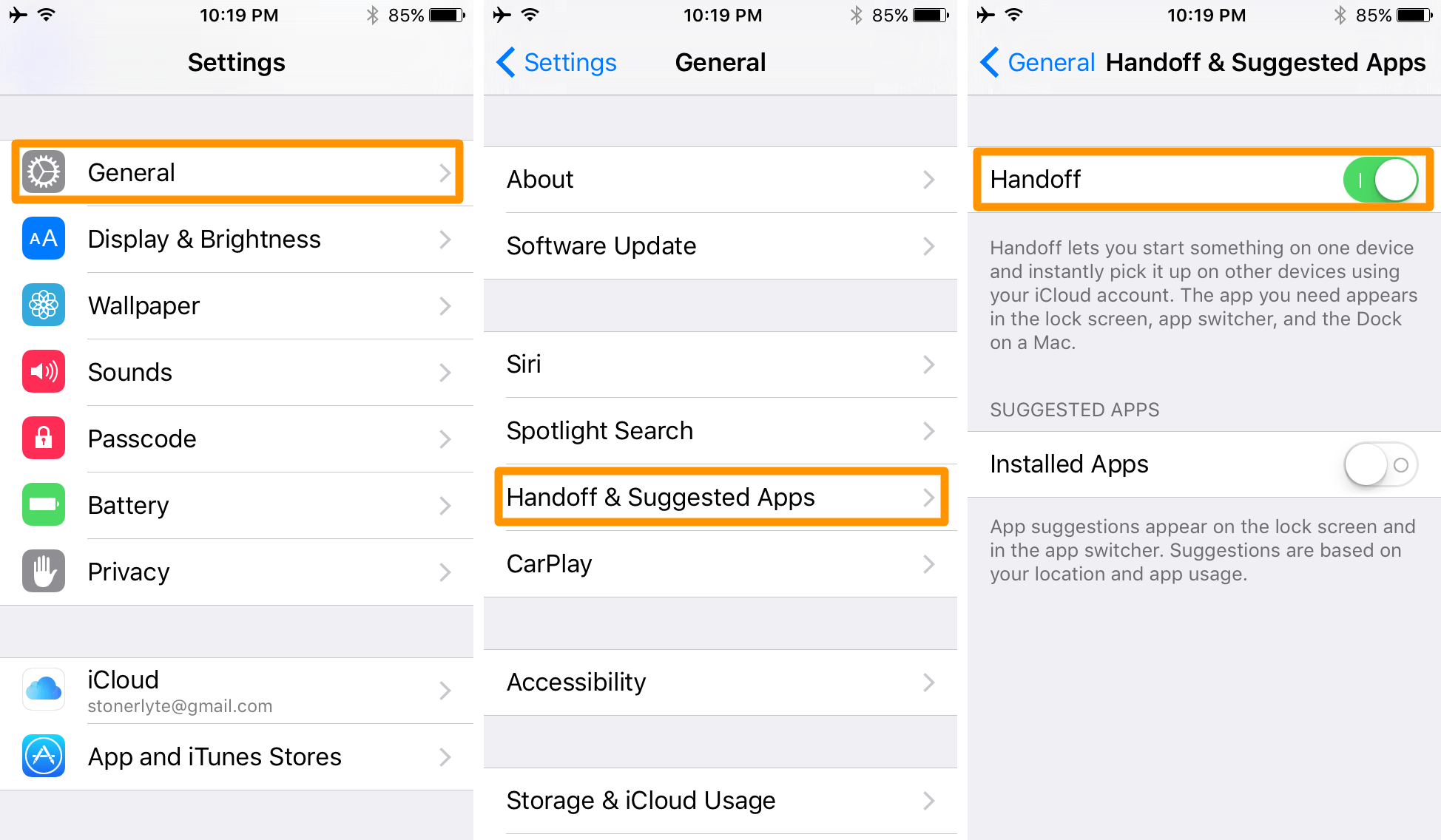
Once you’ve got Chrome installed on both your Mac and iOS device and Chrome Handoff installed on your iOS device, you can go ahead and make sure you have Handoff enabled on your iOS device and on your Mac.
To do this on your iOS device, launch the Settings app and navigate toSettings > General > Handoff, then ensure theHandofftoggle switch is set to the On position:

To enable Handoff on your Mac, launch the System Preferences app from the menu in your Mac’sMenu Bar, and then open theGeneralpreferences pane and put a check underAllow Handoff between this Mac and your iCloud devicesto enable it:
Once you’ve enabled Handoff on both of your devices that you have Google Chrome installed on, and have installed the Chrome Handoff tweak on your iOS device, you should begin to see the tweak take effect immediately.

Handoff will place a Google Chrome icon at the bottom left of theLock screenwhen a browsing session can be transferred from your Mac to iOS, and will also be displayed at the bottom of theApp Switcher.
The end result? Your current browsing experience on your Mac gets brought over to your iOS device, and vice-versa!
My thoughts on Chrome Handoff
Personally, I’m not a Chrome user; I like Firefox, but I do appreciate such a tweak being made because it shows that the jailbreak community is alive and kicking to provide users with a fix for a problem that continues to this day.
The developer notes in the tweak’s Cydia description that the reason Chrome won’t support Handoff out of the box is because Chrome is not being offered in the Mac App Store. Whether or not this is the case, I still find that the jailbreak tweak workaround works just as good as a factory solution; the only catch is that you have to actually have ajailbreak.
After trying the tweak myself, I have to say it works just like you would expect it to. Native Handoff features have been ported over to an unsupported app, and it requires no configuration from the user because the tweak does everything it needs to do on its own in the background. Best of all,it just works.
Wrapping up
For those interested in bringing native Handoff functionality to the unsupported Chrome web browser between their iOS device(s) and Mac, Chrome Handoff is a great option. It’s available free of charge in Cydia’s BigBoss repository right now.
Will you be using Chrome Handoff on your devices? Share in the comments!
